

Finishing the content does not finish the business workflow. A creator campaign should move from approved or live work into an invoice and then into a received payment. BrandMay keeps the amount received, amount remaining, due date, and invoice status connected to that campaign.
BrandMay tracks these records; it does not collect, hold, or transfer the campaign payment between the brand and creator.
Before creating the invoice
Confirm:
- the campaign and brand;
- the deliverables covered by the invoice;
- the agreed amount and currency;
- payment milestones, if the campaign uses them;
- your legal or business name;
- billing address and tax details where applicable;
- the brand billing contact;
- payment terms or expected payment date.
This guide explains product workflow, not tax or legal advice. Use the invoice and tax requirements that apply to your business and location.
Create the invoice
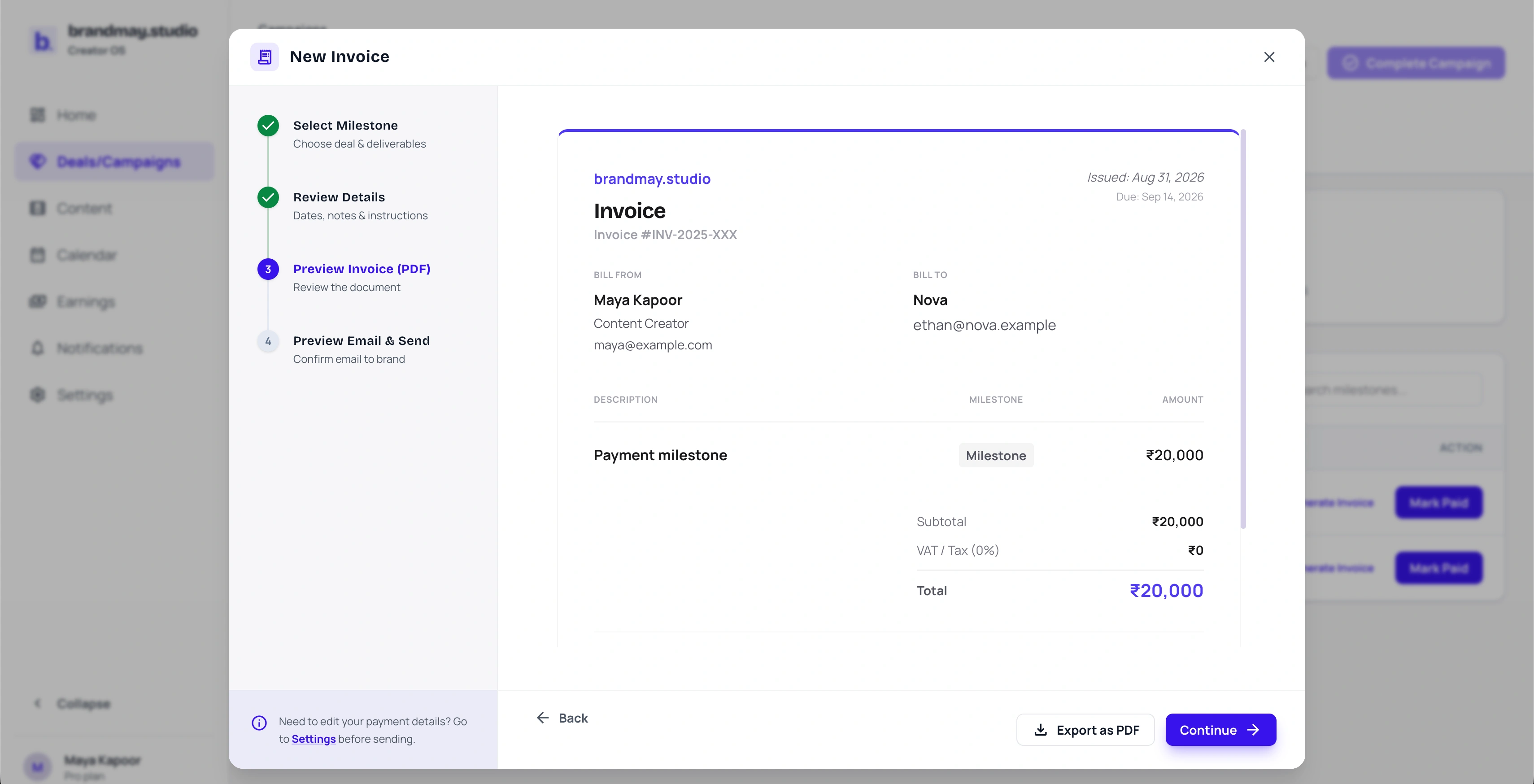
Open the campaign or payment milestone that is ready to invoice and choose the invoice action. In New Invoice, select the milestone, review the dates and instructions, and inspect Preview Invoice (PDF) before continuing. Confirm the creator details, brand, amount, tax and due date; then export the PDF or continue to the email preview.
Do not combine unrelated campaigns simply because they belong to the same brand unless the brand has agreed to a consolidated invoice and your records remain understandable.
Draft is not sent
A draft invoice remains private working state. Mark it sent only after you have actually shared the invoice through the agreed channel.
Record the sent date. If the campaign is connected to a brand workspace, the brand can see eligible sent or paid invoice information; a private draft should not be presented as already billed.
Track expected payment
Add the expected payment date or the terms needed to calculate it. Examples include:
- Due on receipt
- Net 15
- Net 30
- A contractually agreed calendar date
Once the invoice is sent, the next action should give you a follow-up date instead of merely saying “pending.”
Useful states include:
- Next payment expected in 3 days
- ₹25,000 expected today
- ₹25,000 from Nova is 4 days overdue
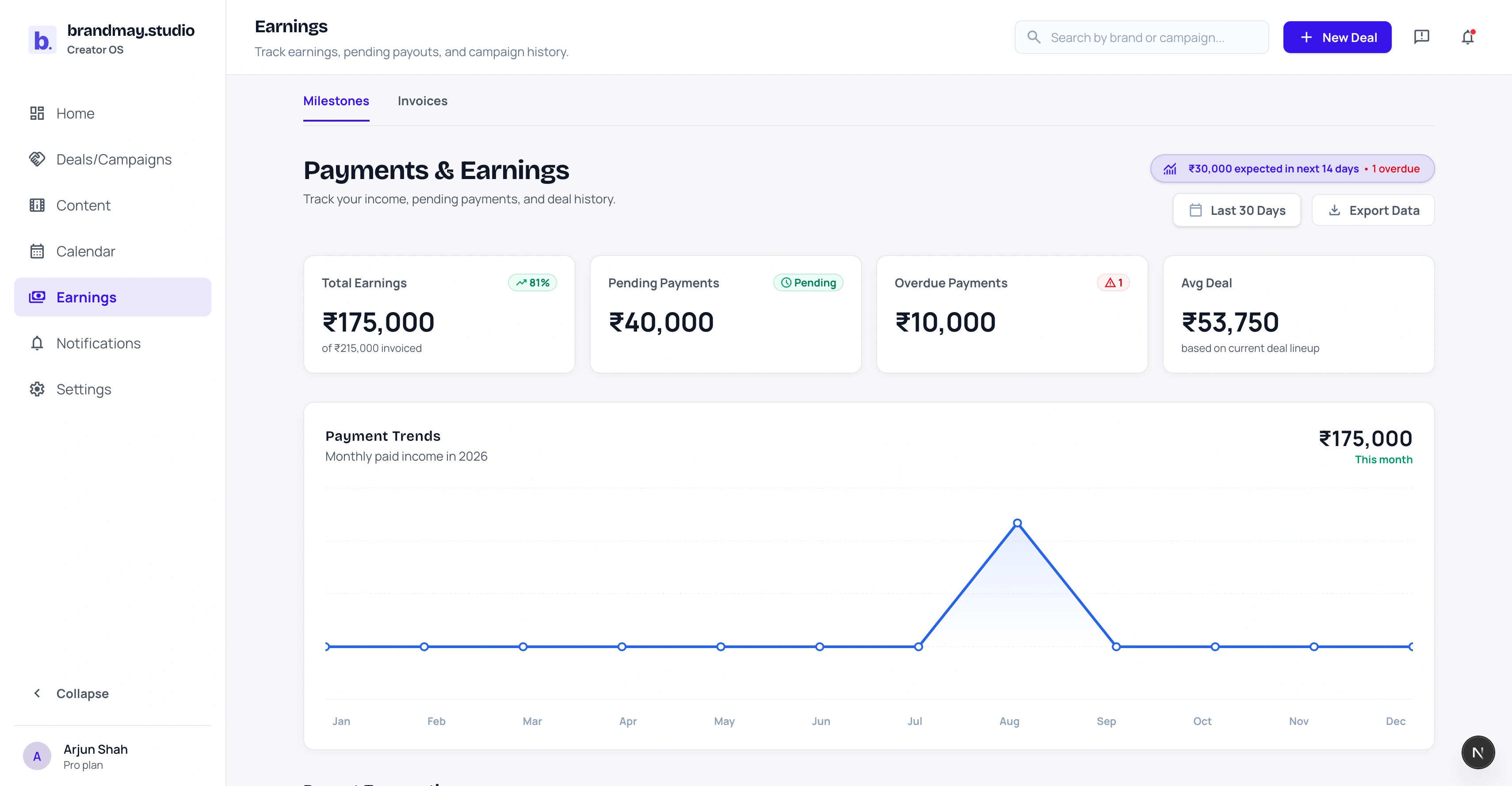
For example, a ₹30,000 campaign with ₹10,000 received should show ₹20,000 remaining. If one ₹20,000 milestone is due on 18 September, that is the next scheduled payment. If no milestone has a date, the remaining ₹20,000 is an unscheduled balance rather than a payment that is already due.
Follow up when payment is overdue
Confirm that the invoice was sent to the correct contact and that no requested document is missing. Then send a factual follow-up:
Hi, I’m following up on the payment for the Nova Glow Serum campaign. Invoice NOV-014 was shared earlier, and payment was expected on 18 September. Please let me know if your finance team needs anything else from my side.
Keep the tone professional and include the campaign, invoice reference, expected date, and requested action.
Do not mark a payment received because the brand says it has been “processed.” Record it when the payment reaches you, unless your accounting policy requires a different event.
Record full or partial payment
When money arrives:
- Open the campaign payment or Earnings item.
- Record the received amount.
- Add the received date and payment mode where useful.
- Check whether the milestone is fully or partially paid.
- Leave the remaining balance visible if money is still due.
For several campaign milestones, update the milestone that the payment satisfies.
Barter collaborations
Barter value is not the same as a cash payment. Keep the item, quantity, estimated unit value, total estimated value, and receipt evidence connected to the campaign.
Do not convert a received barter item into a paid payment merely to close the workflow. Use the barter evidence and completion state designed for that campaign type.
Monthly money check
At least once a month:
- reconcile sent invoices against received payments;
- check overdue milestones;
- verify partial-payment balances;
- correct missing sent and received dates;
- export or store the records needed by your accountant;
- archive financially complete campaigns that no longer need action.
Next step
Open the completed campaign that has not yet turned into a tracked payment and create or send its invoice.
Related guides:
Your next action
Put your next collaboration step into one clear workflow.
Start with the campaign or payment that needs attention today.