

brandmay.studio gives each deliverable a versioned review history. Uploading a file saves a private draft; publishing that draft makes it the current version the brand can review. A brand can review through the secure link as a guest, so a brand account is not required for the first review.
That distinction protects you from accidentally sending an unfinished upload.
Before uploading
Open the correct campaign and deliverable, then confirm it is using Review mode. If you only need to add a live post or proof without collecting comments, use Quick mode instead. Check:
- the content format and platform;
- the due date;
- the campaign brief and usage requirements;
- which brand is connected or invited;
- whether earlier feedback still needs to be addressed.
Use a recognizable filename such as glowline-reel-v2.mp4. The version shown in brandmay.studio remains the authoritative review version.
Upload the draft
- Open the campaign.
- Open the relevant deliverable.
- Choose the draft upload action.
- Select the file and wait for upload confirmation.
- Check the preview and filename.
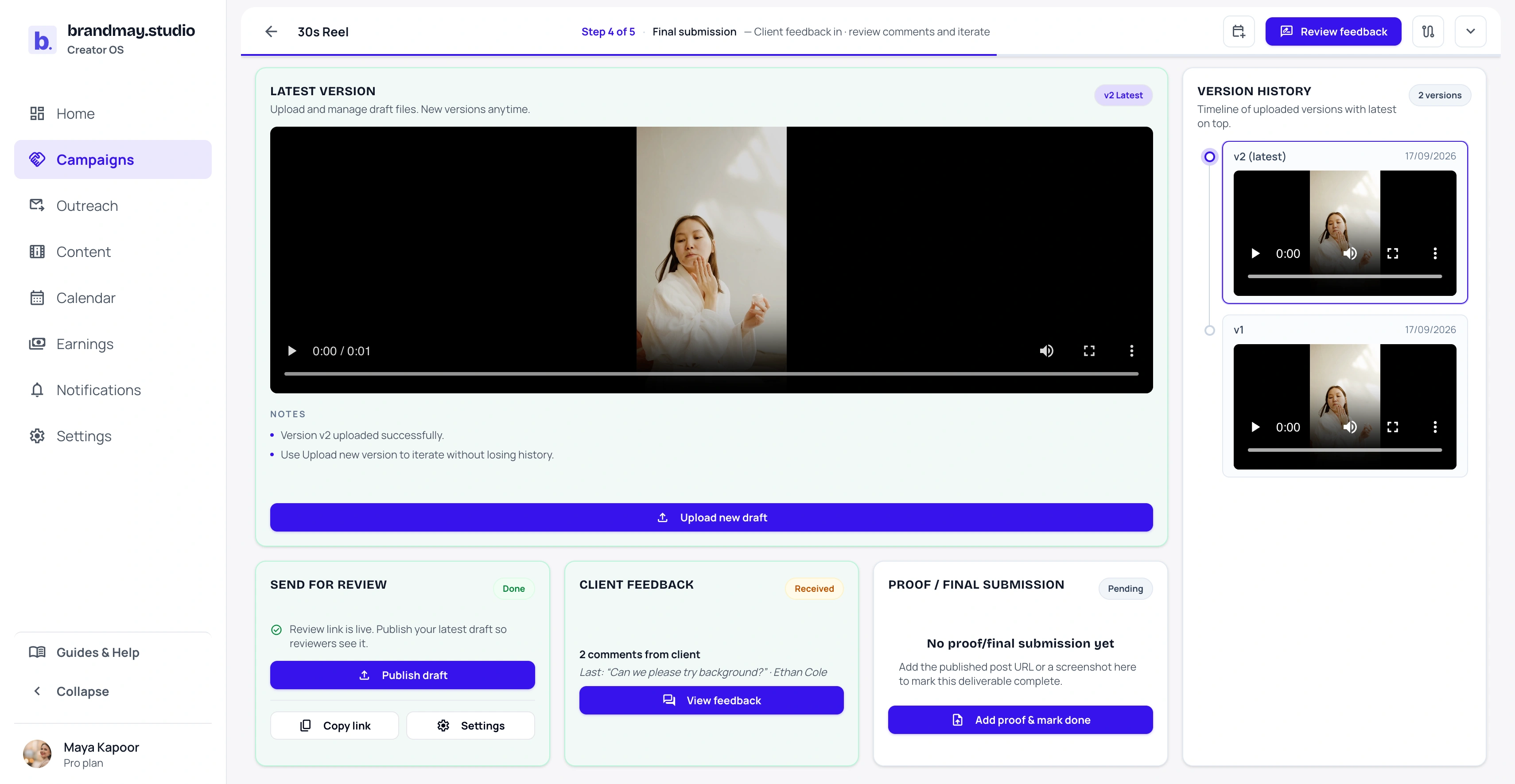
An uploaded file may remain unpublished. If the Send for review panel shows Publish draft, the brand has not received that version for review yet.
Publish the version for review
Choose Publish draft when the uploaded file is ready for the brand. Publishing makes it the current review asset and moves the review workflow into an in-review state. Once the link is active, Open review session lets you inspect the same versioned review workspace the brand will use.
When you later upload a revision:
- the earlier version remains in history;
- its comments and decision stay attached to it;
- the new upload does not replace the historical record;
- the brand reviews the new version only after you publish it.
Create the review link
Open the review-link action for the deliverable.
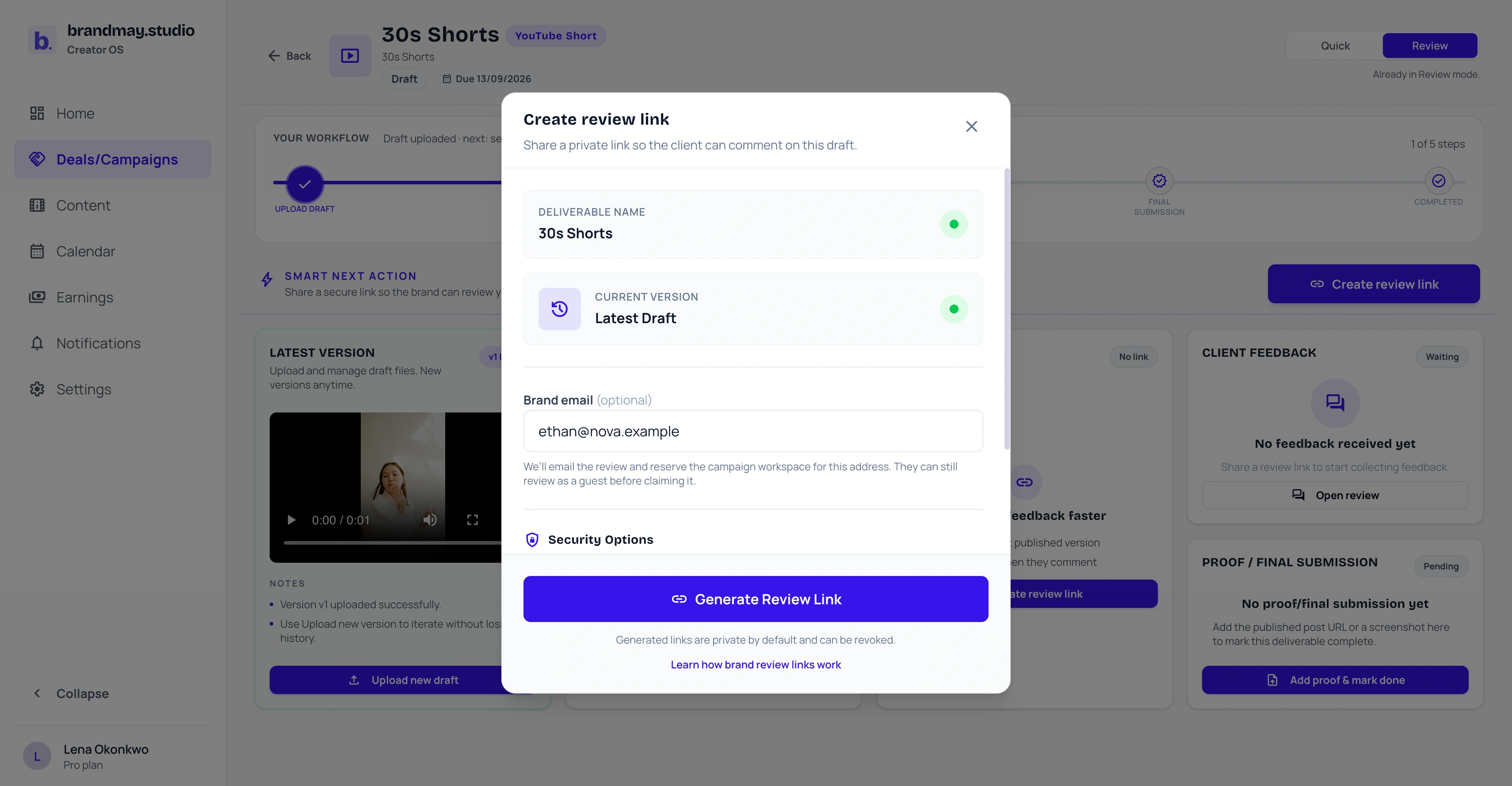
If the campaign is already connected to a brand workspace, the known brand recipient should be shown and the email should not be freely editable.
If the campaign is not connected, add the intended brand email before generating the link. If an invitation is already pending, check the address shown in the warning so you do not invite a different recipient accidentally. You can also copy the generated link and share it through an appropriate channel such as email or WhatsApp.
If you enable a passcode, send the passcode separately from the link where practical.
Tell the brand what to expect
Use a short message:
Hi, the latest Nova Facewash Campaign reel is ready for review. Please use this link to leave version-specific comments or approve the current version. If you claim your brand workspace, you’ll be able to return to this campaign and future submissions without searching for the link.
Do not describe an upload as “final” unless you genuinely intend it to be final.
What the brand sees
The brand opens the same review link you generated. Depending on how you configured the link and whether the campaign is already connected, the reviewer may:
- enter their name and the passcode you provided;
- continue as a guest for this review;
- sign in to an existing connected brand workspace;
- claim the invited brand workspace so this campaign and its future submissions remain easy to find.
Inside the review workspace, the latest published version is the active version. The brand can play the content, add a general or timestamped comment, read the conversation grouped by version, request changes, or approve the latest version. Earlier versions remain visible with their own comments and decisions, but the brand cannot approve an older version while a newer published version is active.
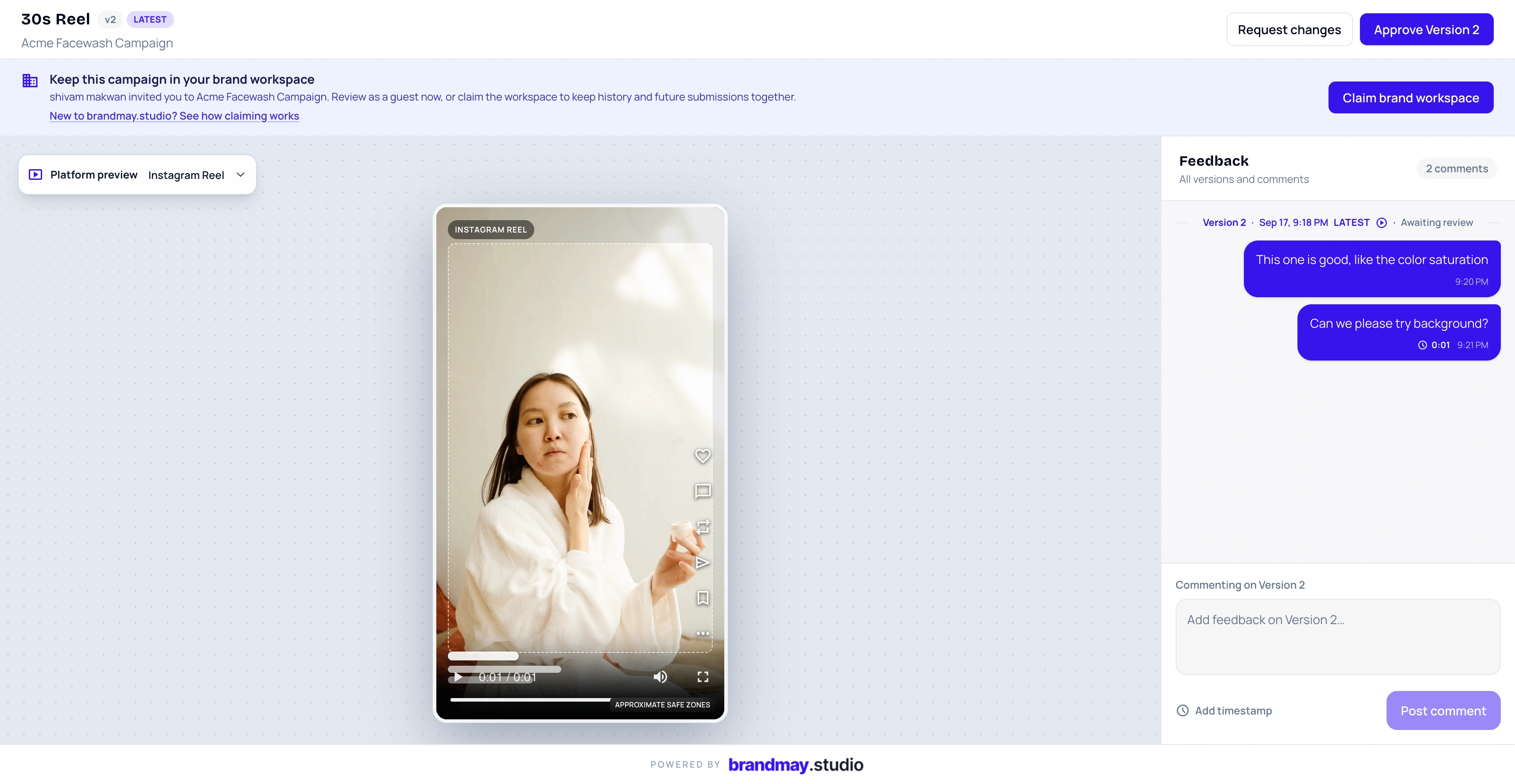
The review link holds more than the file. It also keeps the conversation and approval record for that deliverable.
Respond through the same review link
You can open Open review session from the deliverable page, or open the same shared link in the browser where you are signed in to your participating creator workspace. brandmay.studio recognizes you as the creator and opens the review without asking you to identify yourself as a guest.
From there you can:
- read brand comments in the same version-grouped thread;
- post a response on the latest published version;
- attach the current video timestamp to clarify the exact moment you are discussing;
- move between earlier versions to understand the review history;
- return to the creator deliverable page when you need to upload or publish a revision.
Your response is recorded as creator-authored and can notify members of the connected brand workspace. It is not treated as new brand feedback. You also cannot approve or request changes on your own content; those decisions remain with an eligible brand reviewer.
Use a signed-in creator session for your response. If you deliberately open the link in a signed-out or private browser, the link may treat you as a guest instead of attaching the comment to your creator identity.
Read and respond to feedback
Brand feedback appears by version on the deliverable page. Check whether the brand:
- left comments only;
- formally requested changes;
- approved a specific version.
Comments from your authenticated creator session remain creator-side conversation. They must not be represented as brand feedback or generate a notification saying that the brand commented.
After addressing feedback, upload and publish the next version. Avoid deleting earlier reviewed versions merely to make the list shorter; the history explains what changed and what was approved.
After approval
The approved version should show an approval marker in version history, and the deliverable next action should identify the approved version. Continue with the live post or proof action required by the campaign.
Approval of V2 does not automatically approve V1 or a later V3.
Review-link checklist
- Correct campaign
- Correct deliverable
- Correct published version
- Intended brand recipient
- Passcode shared safely, if enabled
- Clear deadline for feedback
- Earlier feedback addressed
Next step
Open the deliverable you want reviewed and confirm whether the latest upload has been published.
Related guides:
Your next action
Put your next collaboration step into one clear workflow.
Start with the campaign or payment that needs attention today.