

Reaching out to brands is only the first step. The difficult part is remembering who you contacted, where the conversation happened, which application form you completed, and when you should follow up.
A useful creator outreach tracker keeps that work separate from confirmed campaigns while still giving every successful conversation a clear path into deliverables, content review, invoicing, and payment tracking.
Brand shortlist → Contacted → Replied → Applied → Negotiating → CampaignWhy creator outreach becomes difficult to manage
One brand may reply through Instagram. Another sends an email address. A third asks you to complete a Google Form, and another conversation moves to WhatsApp.
A spreadsheet can record these details, but it does not always make the next action obvious. Common problems include:
- following up too late or forgetting completely;
- submitting the same details through multiple forms;
- losing the contact person or application link inside old messages;
- treating every brand you contact as an active campaign;
- recreating brand details after a collaboration is confirmed.
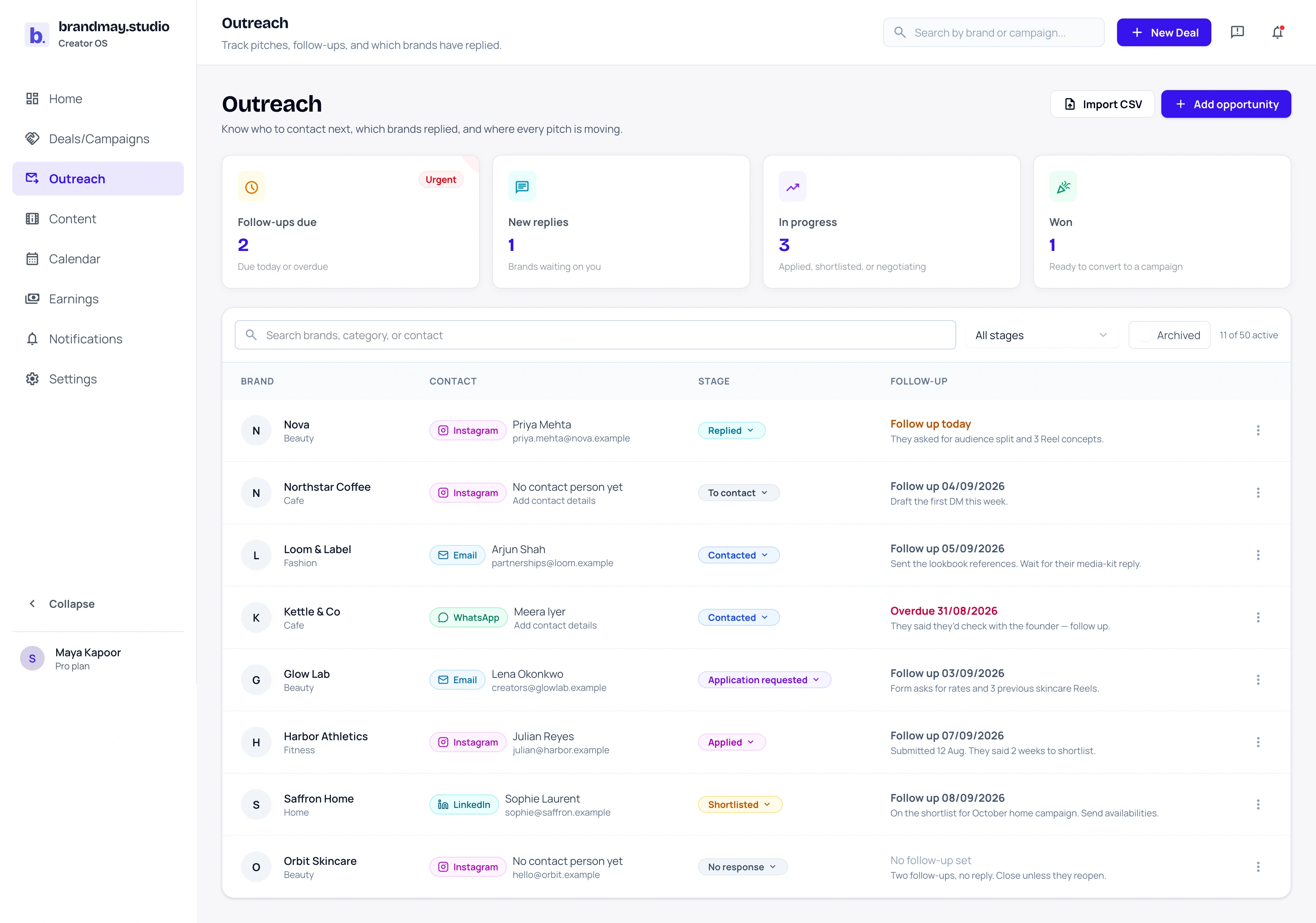
The tracker should answer: Which brand needs my attention next?
What to record for every brand opportunity
Keep enough context to continue the conversation without reopening several apps:
| Field | What it helps you remember |
|---|---|
| Brand and category | Who the opportunity is with and whether it fits your niche |
| Profile or website | Where you researched or contacted the brand |
| Contact channel | Instagram, email, WhatsApp, Facebook, LinkedIn, TikTok, YouTube, website, or another route |
| Contact person | The partnership, marketing, founder, or agency contact |
| Stage | Where the conversation currently stands |
| Application form | The external form the brand asked you to complete |
| Pitch | The message or proposal you sent |
| Last contact | When the brand last heard from you |
| Next follow-up | The next date you should act |
| Notes | The specific next action or important context |
Avoid collecting information merely because a generic CRM would. If a field does not help you decide what to do next, it probably does not belong in your daily outreach view.
Use stages that describe the relationship
Stages should describe the current relationship rather than every action you have taken.
brandmay.studio uses this practical path:
- To contact: You have shortlisted the brand but have not reached out.
- Contacted: Your first message or email has been sent.
- Replied: The brand has responded, but no application or agreement exists yet.
- Application requested: The brand asked you to complete a form or send structured details.
- Applied: You submitted the requested information.
- Shortlisted: The brand has indicated that you are being considered.
- Negotiating: Scope, deliverables, compensation, dates or rights are being discussed.
- Won: The collaboration is confirmed and can become a campaign.
- Lost: The opportunity ended or the brand declined.
- No response: There was no useful response after your chosen follow-up cycle.
Actions such as “DM sent,” “form submitted,” and “follow-up sent” belong in dates or notes. Turning every action into another stage makes the tracker harder to scan.
Keep the contact channel visible
Record where the conversation is happening. A recognizable Instagram, email, WhatsApp, Facebook, LinkedIn, TikTok, YouTube or website label lets you resume it without guessing.
When you add a known social profile URL, brandmay.studio can recognize the likely channel. You can still choose another channel or write a custom one for an agency portal, phone call, event, or referral.
The channel is useful context, but it should not become the main status. Instagram tells you where to act; Follow up today tells you what to do.
Set a specific follow-up date
“Follow up later” is difficult to act on. Choose a date that reflects the conversation and the brand’s instructions.
A respectful follow-up might be appropriate when:
- the brand invited a response but has not replied;
- you submitted an application and the stated review window has passed;
- a contact promised to return with campaign details;
- negotiation is waiting on scope, dates, or compensation.
Avoid sending repeated generic messages. Keep your follow-up useful by mentioning the relevant campaign idea or missing decision.
Example:
Hi! Just following up on the collaboration idea I shared last week. I’d be happy to send audience details or a more specific Reel concept if that helps your team review it.
There is no universal follow-up schedule. A local business conversation and a formal creator programme may move at very different speeds.
Save external application forms with the opportunity
When a brand replies with a Google Form or another application page, save that link against the same opportunity before completing it. Move the stage to Application requested, then to Applied after submission.
Use notes for details that the external form does not preserve for you, such as:
- the concept you proposed;
- expected response time;
- requested deliverables;
- whether compensation was mentioned;
- any portfolio or media-kit link you submitted.
The form belongs to the outreach conversation. It should not become a campaign until a real collaboration exists.
Import the spreadsheet you already use
You do not need to retype an existing tracker. Download the creator brand outreach CSV template, copy your current rows into it, and import the CSV from Outreach.
The importer recognizes common headings such as Brand Name, Category or Domain, Brand Link, Connected on, Status, Collaboration Status, Form Link, Notes, Follow Up, Contact Name, and Contact Email.
Before importing:
- keep one brand opportunity per row;
- include a Brand Name for every row you want imported;
- use complete
https://links for brand profiles and forms; - use valid email addresses;
- review private notes before uploading a shared spreadsheet export.
Malformed URLs or emails are rejected rather than partially written. Unknown columns are ignored, and rows without a brand name are reported as skipped.
Convert a confirmed opportunity into a campaign
Most brands you contact will never become active work, so outreach opportunities should not inflate campaign totals, earnings, deliverables, or invoices.
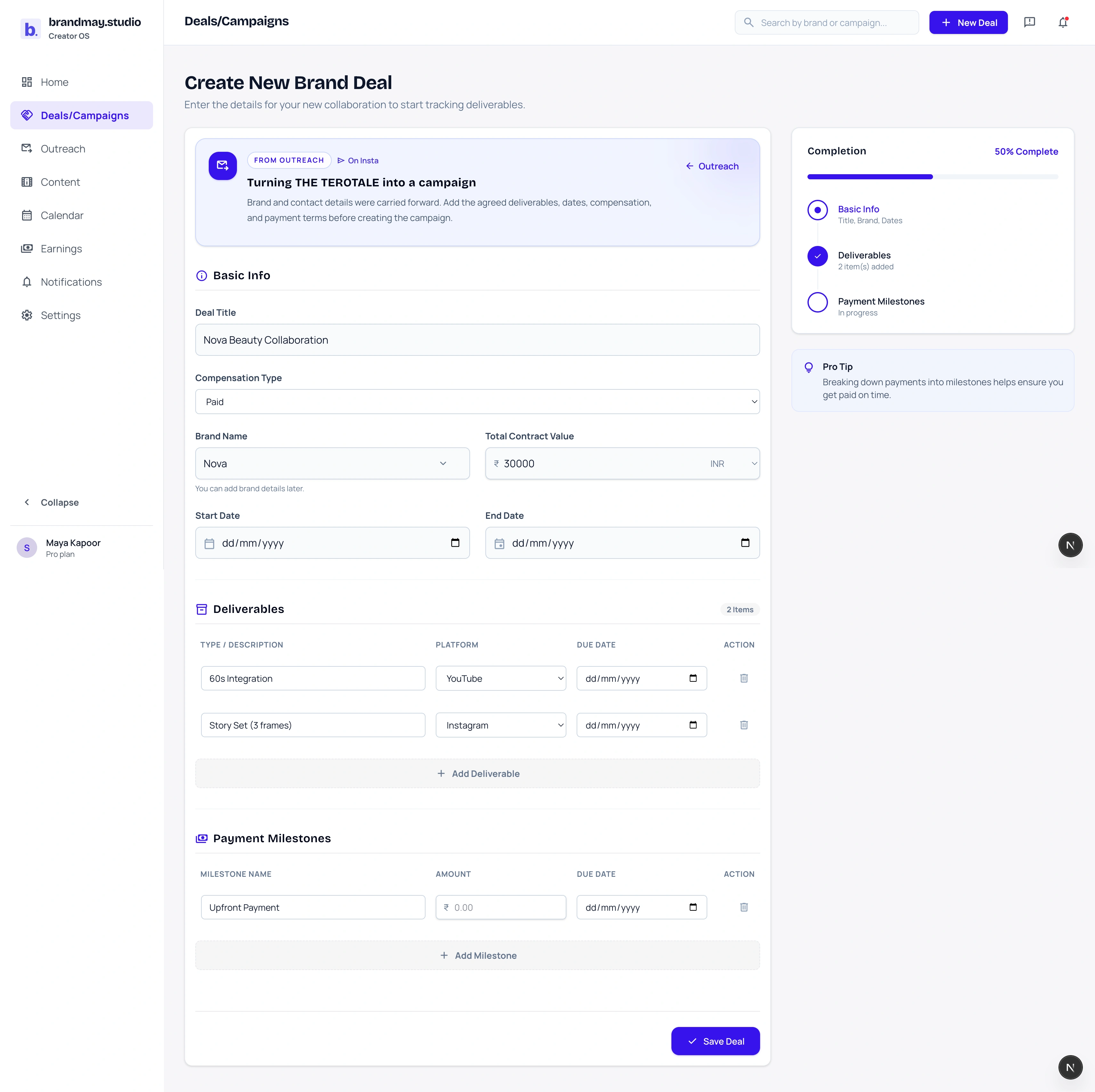
When an opportunity is ready to become real work, use Convert to campaign. brandmay.studio opens the existing campaign form with a From Outreach summary showing the brand and the contact details carried forward. Confirm the brief, compensation, deliverables, dates, and payment milestones before saving. After the campaign is created, brandmay.studio confirms that the outreach opportunity was marked Won.
After conversion:
- the outreach opportunity remains connected to its campaign;
- the campaign becomes the source of truth for delivery and money;
- review versions, approvals, proof, invoices, and payments stay out of the speculative outreach list.
What the free tracker includes
The Free creator plan supports up to 50 active outreach opportunities with:
- search and stage filters;
- manual follow-up dates with due and overdue emphasis;
- contact channels, people, links, pitch text, and notes;
- CSV import from an existing spreadsheet;
- conversion into a campaign without re-entering the brand.
Archived opportunities do not count toward the active limit. Existing data remains readable if your plan changes; archive older opportunities before creating or importing above your current allowance.
Automation, reusable outreach sequences, advanced conversion analytics, custom stages, and multiple public creator pages are not part of the current free tracker.
A simple weekly outreach routine
Once or twice a week:
- Open opportunities with overdue or today’s follow-up.
- Send the useful follow-up or update the next date.
- Move replied and submitted opportunities to their truthful stage.
- Close lost or no-response opportunities instead of leaving them active forever.
- Convert confirmed collaborations into campaigns.
- Archive opportunities you no longer need in the active view.
This keeps Outreach focused on conversations while Campaigns holds the work you have agreed to deliver.
Next step
Add the brands currently living in your spreadsheet, saved messages, or memory. Start with the opportunity that needs a follow-up today.
Related guides:
Your next action
Put your next brand follow-up somewhere you will see it.
Add the brand conversations currently spread across messages, forms, and a spreadsheet.